




Discount codes and promotions
Received a Tutto Pasticceria coupon? Enter it in your cart and check the discount before payment.
Go to cartHow to apply your discount code
Open the code field in your cart
Add your products and open your cart. In the order summary, select ‘Have a discount code?’.
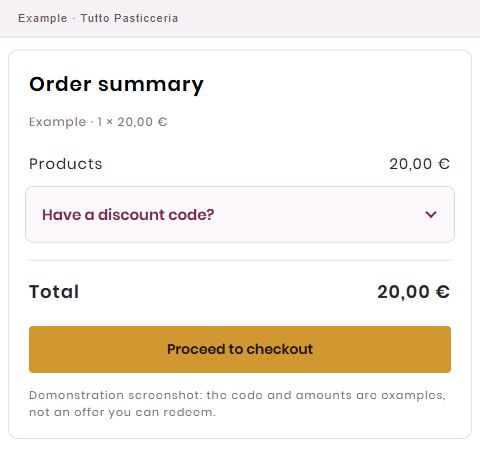
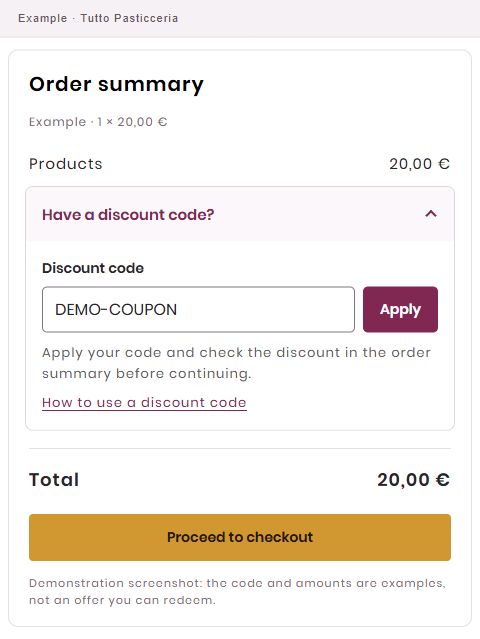
Demonstration screenshot: the code and amounts are examples, not an offer you can redeem. Enter your code and select Apply
Copy the code from the message you received and paste it into the ‘Discount code’ field. Select ‘Apply’.
Demonstration screenshot: the code and amounts are examples, not an offer you can redeem. Check the discount and total
When your code is accepted, the summary shows ‘Code applied’ and the reduction. Check the updated total before continuing to payment.
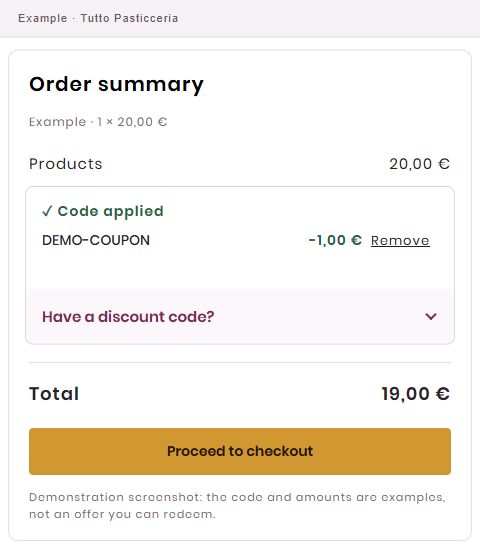
Demonstration screenshot: the code and amounts are examples, not an offer you can redeem.
Newsletter coupon
New newsletter subscribers may receive a 5% discount code for orders of at least €10. Always check the email for validity and any exclusions.
Validity and conditions
Offers and discount codes apply under the conditions shown in your cart or in the message you received. Check the expiry date, minimum order and any excluded products; combining codes depends on the promotion’s conditions.
Code not accepted?
Read the message next to the field: it may explain why the code cannot be used. Check that you copied it correctly, its validity and the conditions you received. If the problem continues, contact us before completing your order.
Contact usFree shipping
Where the cart conditions apply, free shipping is calculated automatically for orders of at least €99. Check costs and availability for your destination at checkout.
Useful questions
How do I know my code has been applied?
Check the confirmation, discount line and total in the summary. Entering the code alone is not enough: you need to select ‘Apply’.
Can I remove a code from my cart?
Use ‘Remove’ next to the applied code and check the total again.
